Tampilkan postingan dengan label belajar blog. Tampilkan semua postingan

A five step plan for your 2013 link building campaign


New post on AyobelajarNet about 2013 link building campaign. Backlinks are still the most important ranking signal of Google, Bing and other search engines. Since Google's Penguin update, bulk-link spam doesn't work anymore and the quality of the backlinks has become more important than ever before.link building 2013


A good plan will make your link building activities much more efficient. The following steps will help you to create a great plan for your 2013 link building campaigns:

Step 1: check the current state of your website

Check the status quo before you start with a new campaign. What makes your website linkworthy? Why should other websites link to your site? Do you know where your customers can be found on the web? Does your website offer content that interests your customers?

Step 2: set your goal

Getting more links is not a goal. Your link building campaign should contribute to the main goals of your  search engine optimization campaigns. For example, you could target these goals:

        Get at least 20 links from related websites that will deliver targeted visitors to my website.
        Getting at least 100 links from related websites that contain keywords that are related to my business to improve my search engine rankings.

Your goals should be specific, measurable, achievable, relevant, and trackable.

Step 3: make sure that your website is linkworthy

The best link building campaign won't work if your web pages aren't linkworthy. Other websites won't link to your website for no reason.

To create linkworthy content on your web pages, you could do the following:

        Improve existing content and make it more attractive.
        Use offline content of your company and make it available online.
        Interview people who are related to your business.

Linkable content is useful and interesting. Offer the answer to the questions that your customers ask, offer interesting facts about the products and services that you sell and show your website visitors why your company is better than your competitors. If it makes sense, include as many photos as possible.

Step 4: put your ideas to the test

Double check your linkworthy content. Do other people really care about this content? If the content is just about you, chances are that not many people will care.

Ask people inside and outside your company for feedback why your ideas will work and why your ideas won't work.


Step 5: get things done

When you've finished step 1-4, it's time to get things done. Locate good websites that could link to your website and contact the owners of these websites.

The link building tools in IBP can help you to find these links as efficiently as possible. IBP also helps you to get the contact information of the other websites and it helps you to keep track of your link building activities.

Getting good backlinks is the key to high rankings on Google and Yahoo/Bing. The plan above will help you to achieve your goals as quickly as possible.


src: www.free-seo-news.com

Mention people in your posts with Google+

New post on AyobelajarNet about Google+ mentions in Blogger. Blogs are a great way to spark a conversation, and today we’re giving you a new way to grab someone’s attention: Google+ mentions in Blogger.  Now you can add a link to a Google+ profile or page when you want to mention someone in a post. If you then share your post from Blogger to Google+, we make it easier to notify your mentions by including them in the sharebox.

To mention someone, just type “+” before their name while you’re using the Blogger post editor.


The profile or page will show up as a link in your published post.  Hovering over will show a card with more info and an ‘Add to circles’ button. Clicking the link takes you straight to the Google+ profile or page.

So, whether you want to credit a co-author (thanks +Gregory Fair!), ask a question, or just kick off a dialogue, connect your blog to Google+ and try mentioning someone in your next post!


Thank, 
Share this.

Increase Alexa Traffic Rank for Blogger


quick and easy steps to improve you blogger blog traffic ranking, as we all know alexa.com is a company on the internet
that gives every single site on the internet it’s own rank.
there is web sites ranked 24.000.000 and another ranked under the 100.000
and the second is all what we need.
when i started publishing this site. my alexa rank was 6.300.000.
but now, thank god it is just 993.778, and it’s increasing day by day.
alexa updates the rankings every 4 or 5 days. and you can monitor the changes that happen to your traffic rank and try to improve it always.
and here i gonna tell you some easy, cheap, fast steps that will make your rank increase quickly. and it works for me.
1. the first one here should be the most famous advice when it comes to alexa traffic rank increasing. installing alexa toolbar.and when you browse your blog every day. Ask your friends to do the same. Every time you browse your blog, Alexa Toolbar will communicate your visits to the Alexa Ranking Engine, which will update your ranking.
actually alexa depending on the toolbar to arrange the rankings.
2. set you blog as the home page for your browser.
and try to do it with all your friends and every computer you can control.i mean if you work at big company and there is big number of computers there. if you can set all browsers home page to you blog url, that’s going to be great.
3. try to add webmasters category to your blog, because all webmasters already installed alexa toolbar, and that’s must affect your rank when they visit your blog with alexa toolbar installed.
4. Increase traffic to your blog. That is what alexa is all about. and when you visit any blog or forum with related content, leave your link there as comment or reply.
5. Add alexa rank widget to your blog. alot of people did it and it works for them.
6. Right article about alexa and encourage people to download the alexa toolbar.
i hope you all good luck and higher traffic rank.
max.

Memasang Widget Populer Post (komentar terbanyak)


Dalam blogging, ada beberapa jenis populer post seperti populer post berdasarkan jumlah hits, populer post berdasarkan jumlah share dan populer post berdasarkan jumlah komentar, pada postingan berikut, saya ingin berbagi trik untuk memasang widget Populer Post berdasarkan komentar terbanyak di blog anda. 
Trik berikut cukup gampang bagi pemula, silahkan dicoba : 

1. Login ke akun Blogspot anda (masuk ke dashboard)
2. click Design pada blog yang akan dipasangkan widget tersebut.
3. tambahkan gadget baru ('Add a Gadget')
4. pada jendela Add a Gadget pilih option HTML/JavaScript, selanjutnya akan muncul jendela configurasi untuk widget tersebut seperti pada gambar disamping.
5. copy code berikut dan tempelkan di field content seperti pada gambar di samping. 

<script type="text/javascript">
function pipeCallback(obj) {
document.write('<ul style="text-transform: capitalize;">');
var i;
for (i = 0; i < obj.count ; i++)
{
var href = "'" + obj.value.items[i].link + "'";
var item = "<li>" + "<a href=" + href + ">" + obj.value.items[i].title + "</a> </li>";
document.write(item);
}
document.write('</ul>');
}
</script>
<script src="http://pipes.yahoo.com/pipes/pipe.run?_render=json&_callback=pipeCallback&_id=a7d3195528df5e96181a3d2712266226&url=http%3A%2F%2Fjeanotnahasan.blogspot.com&num=10" type="text/javascript"></script> 

6. ganti teks berwarna hijau dengan alamat blog anda.
7. SAVE widget tersebut dan rasakan perubahannya.
  
ketereangan :
  • warna hijau merupakan alamat/link/URL blog anda.
  • warna pink merupakan jumlah postingan yang akan ditampilkan.
 
Thanks, AyobelajarNet mencoba berbagi... semoga bermanfaat kawan, 

Mengganti icon blog di addres bar

hy teman teman smuanya...
aq mw berbagi sedikit trik mengenai dunia blog...
mungkin diantara kalian sudah banyak yg tau, tapi g’ ada salahnya klaw di bagi dengan yg lain....

Pertama, buat dulu icon pribadi Anda di adobe photoshop untuk tampil di address bar. Icon tersebut berukuran 0.42 x 0.42 cm atau agak besaran dikit 0.71 x 0.71 cm jadikan formatnya CompuServe atau GIF biar ukuran gambarnya kecil di bawah 2kb tapi JPG juga ga apa2.

Kedua, upload icon Anda ke salah satu server photo gratisan semisal photobucket, picasa, atau servimg bisa juga nyimpan di googlepages. Hingga menjadi Direct links - Image url, dengan kata lain kita punya alamat icon pada salah satu server di atas

masuk ke "Layout --> Edit HTML" trus tempatkan script berikut sebelum kode </head>

kemudian copy kode di bawah ini,

<link href=’http://sites.google.com/site/tipsandcara/Home/sidesubs_feedburner2.jpg’ rel=’SHORTCUT ICON’/>

ganti huruf yang dicetak tebal dengan lokasi (URL) gambar dimana kamu menyimpannya. ...
kode di atas merupakan contoh dari icon blog ini....

sidesubs_feedburner2


tambahan trik : cara cepat ganti icon tanpa registrasi di photobucket, picasa, atau servimg (direktori penyimpanan)

agar tidak perlu repot repot registrasi di photobucket, picasa, atau servimg,, nih ada trik tambahan dari ayobelajarnet.blogspot.com... anda tinggal pake aja gambar2 yang uda ada, atau upload aja via blog anda...

setelah itu klick kanan pada gambar yang sudah di upload/gambar yang sudah ada > kemudian pilih copy image location.

langsung aja deh ganti link yang dicetak tebal diatas dengan mem-paste kan link image yang sudah di copy....

Free Template Blogspot

Postingan ini aq copas dari http://www.kangnoval.com/ (hehehe...udah malas ngetik)
Berikut ini adalah list free blogger template yang saya temukan di internet dan adapun jika link2 di bawah ini sudah tidak bisa diakses itu berarti bukan kesalahan saya karena pada saat saya akses linknya masih ada, Teman-teman nih saya mau sharing tempet untuk download templet blogspot yang sudah di modifikasi dan bagus-bagus tinggal anda pakai dan kalau teman-teman tahu tempet tempelt yang lain di share disini ya...
freetemplates.blogspot.com
www.eblogtemplates.com
www.finalsense.com
www.blogspottemplate.com
www.geckoandfly.com
freshbloggertemplates.blogspot.com
www.suckmylolly.com
k2modify.blogspot.com
www.blogcrowds.com
webbietips.blogspot.com
btemplates.com
blogandweb.com
freeskins.blogspot.com
www.template-godown.com
www.ourblogtemplates.com
layout4all.blogspot.com
templatepanic.com
goblogtemplate.com
butikkita.com
sushidating.com
mashable.com
bloggerbuster
wishix.com
bloggertrick
bloggero.com
blogtemplate4u.com

List tambahan blogger template gratis:
www.zoomtemplate.com - blogspot template dan wordpress template list
www.bloggertemplates.org - blogspot template
www.bloggerstyles.com - blogger template
www.deluxetemplates.net - template blogger juga
www.bloggerthemes.net - template blogspot
www.allblogtools.com - all blog template
www.ipietoon.com - blogtemplate
www.btheme.info - blogspot template
www.cahayabiru.com - template blog

silahkan tambahkan lagi ya listnya biar rame gitu.........

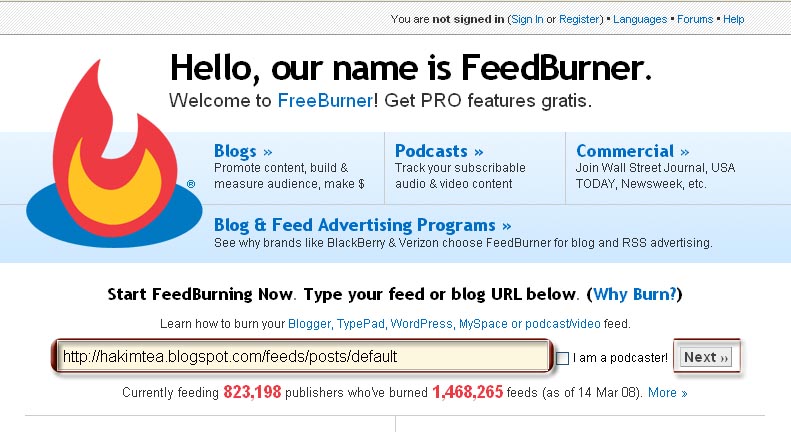
Daftar & Cara Setting Feed Blogger Ke FeedBurner Plus "Bonus" Memasang 3 Widget FeedBurner

Untuk meningkatkan pembaca/traffic blog kita, salah satu caranya adalah mendaftarkan feed blog ke feedburner. Untuk personal blog mungkin tidak menjadi masalah mau dapat pembaca/traffic banyak atau sedikit *its not a big deal*, sudah bisa eksis ngeblog dan nulis via blog juga sudah jadi kebanggaan tersendiri. Berbeda bagi blog yang memang membutuhkan traffic dengan lalu lintas pengunjung yang terus meningkat setiap harinya agar income via internet pun semakin bertambah, jika demikian feedburner salah satu pilihan yang tepat untuk mendatangkan pengunjung baru setiap harinya. Untuk menambah traffic dan income atau sekedar menunjukkan, "Hello World, here I'am, and is myblog and mystory...!" :)

APA ITU FEEDBURNER...?
Feedburner adalah salah satu "LAYANAN GRATIS" penyedia jasa media publikasi dan audience. Layanannya berupa penyebaran content Blog dan RSS Feeds, yang memungkinkan untuk berpromosi baik secara komersil ataupun menambah profit dalam berbisnis melalui internet. Atau "sekedar" ingin mengenalkan blog Anda agar "go international" dan menambah pembaca dari seluruh dunia. Lebih lanjut mengenai feedburner klik disini.

Saya rasa testimoni yang dikatakan Michael Webster dalam blognya sudah cukup mewakili, "Feedburner is an excellent way to publicize your blogsite and has many useful tools to make easier for people to access. To top it off, the customer and technical assistance they provide is absolutely top-notch."


di sini saya hanya meninggalkan satu blog sahabat untuk anda kunjungi....


http://hakimtea.blogspot.com/2008/03/daftar-cara-setting-feed-blogger-ke.html?showComment=1254068667837#c6419612135867254131 


click aja link di atas dan anda langsung menemukannya...

Cepat di index google dan search engine lainnya


Apakah anda kesal karena website anda belum di index sama Google ? Bagaimana cara mudah agar website anda cepat di index sama google ?
Untuk tujuan SEO lebih baik jika kita membeli domain yang sudah ada ( semakin tua domain maka semakin ber harga dan biasanya sudah di index sama search engine) , untuk domain baru kita butuh usaha dan waktu lebih lama untuk SEO.
Kadang - kadang butuh beberapa minggu agar website dengan domain baru di index sama Google. Untuk membuat cepat website di index sama google , yang memungkinkan dalam 24 jam sudah terindex maka kita perlu sedikit usaha, berikut adalah cara - cara nya :
Buatlah 5 halaman / content dari website anda.
Biarkan tetap dalam “under construction”di halaman utama dan buatlah sekitar 5 kontent atau lebih dimana tiap content terdiri dari beberapa paragraph.
Buat Internal Links ke semua halaman
Buatlah template / tampilan website anda dengan template yang mempunyai menu. Anda bisa cari template gratis atau berbayar dari berbagai sumber di internet. Buatlah link ke semua halaman / content dari menu tersebut.
Buat Tag pada Social Bookmarking
Daftarkan link ke website anda pada social bookmarking. Ini akan memberi jalan untuk Google dan search engine lainnya untuk menemukan link website anda karena search engine akan rutin bots /crawl dalam waktu yang singkat. Social bookmarking yang ngetop saat ini adalah : Del.icio.us, BlinkList, StumbleUpon.com, and Furl.
Tinggalkan comment pada website / blog yang top.
Carilah sekitar 5 blog yang sudah lumayan populer ( google page rank > 3 ) yang isinya ada hubungan dengan website anda dan ada post yang baru di blog tersebut. Baca post baru tersebut dan tinggalkan comment yang berhubungan dengan post dan cantumkan link ke website anda pada kolom URL website.


Buat, Daftarkan , dan Ping XML Sitemap wbsite anda.
Buatlah sitemap website anda ( cara membuat nya coba cari digoogle dulu ya ) dan upload ke website anda (buat dengan nama sitemap.xml). Lalu ping google dengan ketik url berikut pada browser anda . ganti nama domain dengan nama domain anda.
http://google.com/webmasters/sitemap...om/sitemap.xml

Berikutnya buat account anda untuk Google Webmaster Central , tambah alamat website anda dan daftarkan XML sitemap situs anda.

Daftar pada Google Analytics

Buat account google analytics anda dan tambahkan alamat website anda dan jangan lupa verifikasi di website anda agar google analytics akan mengkoleksi data dari web anda.

Daftar pada Google Ads

Buat account Google adwords dan tambah iklan dari website anda.Dengan menamabh di google adwords maka ini bisa jauh mempercepat website anda keindex sama google. (Tapi yang satu ini saya juga belum pernah coba...)

Dengan langkah - langkah diatas maka seharusnya website anda akan lebih cepat diindex. Tidak ada jaminan dalam 24 jam tapi ini sangat memungkinkan terindex kurang dari 24 jam. Buka di google webmaster tool apakah website anda sudah di index dan lihat di Google analytics apakah sudah ada pengunjung ke website anda. Semoga berhasil.

 
ayo beLajar © 2011 | JNC | Twitter Follow us on Twitter | Facebook Friend us on Facebook | LinkedIn Join us on Linkedin
| Back to Top